On this page
Every billing team has the same quiet problem: skilled people spend hours on work that follows fixed rules. They re-key patient details into payer portals, check the same eligibility screens, chase claim statuses, and post payments line by line. Each manual step is a chance for a typo, a missed deadline or a claim that never gets worked. Robotic process automation in healthcare targets exactly that kind of work.
This guide explains what RPA is, where it fits in the revenue cycle, how it differs from AI, whether it is HIPAA compliant, and how to roll it out without creating new risks. It is written for practice managers, hospital revenue cycle leaders, urgent care and lab owners, and new practice founders.
What Is Robotic Process Automation in Healthcare?
Robotic process automation (RPA) in healthcare is software that imitates the clicks and keystrokes of a human worker to complete repetitive, rule-based administrative tasks, such as checking eligibility, submitting claims and posting payments, across EHR, practice management, clearinghouse and payer systems.
The main benefit: RPA removes manual, repeatable work from the revenue cycle so staff can focus on exceptions, denials and patient-facing tasks. The key limit: RPA follows rules. It does not judge, interpret or learn on its own.
Why RPA Matters Now: The Cost of Manual Billing Work
What the CAQH Index shows
The 2025 CAQH Index, released in February 2026, estimates that U.S. healthcare avoided about $258 billion in administrative costs in 2024 through electronic transactions and better data exchange, a 17 percent increase in cost avoidance. The same report finds a further $21 billion savings opportunity if remaining manual and partially manual transactions are fully automated. It also reports that more than 50 percent of health plans and 25 percent of provider organizations use AI tools in administrative workflows.
Two cautions. First, these figures cover automated electronic transactions in general, not RPA specifically. Second, they are industry-wide totals, not a promise for any one practice. They do show where the opportunity sits: in routine transactions like eligibility, claims and payments that many organizations still handle by hand.
What RPA is not (and where revenue still leaks)
RPA does not fix a broken workflow. If registration collects the wrong insurance data, a bot will faithfully carry the error to every downstream system, only faster. That is why RPA works best alongside clear front-end processes and good coding. See our guide on revenue leakage in medical billing for the places money slips away even in well-staffed offices.
How RPA Works in a Revenue Cycle
A software bot is given a script and credentials, then performs the same steps a biller would: log in, search a patient, read a field, copy a value, update a record. Bots usually work at the screen level, so they can operate on systems that lack a modern API. Many are paired with optical character recognition (OCR) to read scanned documents.
-
Attended bots run on a staff member's desktop and assist with a task on demand.
-
Unattended bots run on a schedule or trigger, such as an overnight batch of next-day appointments.
-
Exception queues hand anything the bot cannot resolve to a human, which is the single most important design feature.
RPA vs AI in Healthcare: The Key Difference
The short answer: RPA executes fixed rules on structured steps; AI interprets, predicts or generates based on patterns in data. RPA does what it is told. AI makes a judgment call, which is why it needs more oversight.
|
Feature |
RPA |
AI / machine learning |
|---|---|---|
|
How it works |
Follows scripted if-then rules |
Learns patterns from data |
|
Best with |
Structured, repetitive tasks |
Unstructured or variable inputs (notes, scanned documents, free text) |
|
Typical billing task |
Eligibility lookup, claim status check, payment posting |
Reading a clinical note to suggest codes, predicting which claims will deny |
|
Handles exceptions |
Routes to a human |
May attempt a decision; needs review and monitoring |
|
What breaks it |
Portal layout changes, new login steps |
Poor or biased training data, drift over time |
|
Explainability |
High: every step is scripted |
Varies by model |
AI and RPA in medical billing together
Most mature programs combine the two. AI or intelligent document processing reads an unstructured input, such as a faxed authorization letter or an explanation of benefits, and RPA carries the result into the billing system. For more on how the two fit into a billing operation, read our overview of AI and automation in medical billing.
Top Use Cases of RPA in Healthcare
RPA also appears in scheduling, patient onboarding, HR and supply chain work, but the strongest business case for most U.S. providers sits in the revenue cycle. The table maps each use case to the leakage it addresses.
|
Use case |
What the bot does |
Where a human stays involved |
Leakage it targets |
|---|---|---|---|
|
Eligibility and benefit checks |
Queries payer portals or clearinghouse for coverage before the visit and writes results to the patient record |
Inactive coverage, coordination of benefits conflicts |
Denials for coverage issues |
|
Prior authorization status checks |
Looks up whether an authorization is on file and its status |
Submitting clinical documentation, peer-to-peer calls |
Services rendered without authorization |
|
Charge and demographic validation |
Checks required fields, ID formats and basic payer rules before billing |
Coding questions, documentation gaps |
Rejections and rework |
|
Claim scrubbing |
Applies payer and code-edit rules before submission |
Edits that need coder judgment |
Preventable rejections, slower payment |
|
Claim submission and status follow-up |
Submits batches and checks status at set intervals |
Claims stuck with no response |
Timely filing losses |
|
ERA and payment posting |
Matches remittances to claims and posts payments and adjustments |
Unmatched payments, unusual adjustments |
Posting errors, delayed cash |
|
Denial triage |
Reads denial codes, sorts into work queues, flags appealable denials |
Appeal strategy and letters |
Write-offs from unworked denials |
|
Underpayment detection |
Compares paid amounts with contracted rates loaded into the system |
Disputes and payer negotiation |
Silent underpayments |
Eligibility checks and prior authorization
A bot-driven eligibility check is often the best first project because the task is high-volume, rule-based and easy to measure. The bot runs checks ahead of appointments so staff can fix coverage problems before the visit instead of after a denial. Learn more about why this step matters in our guide to the eligibility verification process.
Prior authorization automation is harder. Bots can check status and populate forms, but the clinical documentation and payer negotiations still need people. Practices that prefer to hand off this work can look at eServMD's eligibility and authorization services.
Claim scrubbing and submission
Scrubbing claims automatically means running each claim through payer-specific and code-edit rules before it leaves your system. The goal is a higher first-pass acceptance rate, usually tracked as the clean claim rate. Healthcare claim automation works best when edit rules are kept current; a stale rule set simply automates yesterday's mistakes.
Payment posting, denials and A/R follow-up
Posting remittances line by line is slow and error-prone, which makes it a classic bot task. Denial management software and bots can then sort denials by reason code and route them to the right worker. The appeal itself still needs judgment; our guide to denial management in medical billing explains that human side.
How RPA Solves Healthcare Revenue Leakage
RPA reduces revenue leakage by making sure routine checks happen every time, on time and the same way, rather than when staff have capacity.
Leakage typically appears at three points:
-
Before the visit: unverified coverage, missing authorizations, incomplete demographics. Bots run checks on every scheduled patient, not just the ones someone had time for.
-
Before submission: missing fields and rule violations that cause rejections. Automated validation catches these while they are still cheap to fix.
-
After submission: unworked denials, unposted payments, claims that age past filing limits, and underpayments. Bots check status on a schedule and flag what needs attention.
The effect is consistency, not magic. A bot cannot recover a denial that was caused by missing documentation, but it can make sure the denial is seen, categorized and queued on day one.
Is Robotic Process Automation in Healthcare HIPAA Compliant?
RPA is neither automatically compliant nor non-compliant. HIPAA applies to how protected health information (PHI) is accessed, used, stored and disclosed, so compliance depends on how the bots are configured, what data they touch, and whether any vendor handling electronic PHI is under a proper contract.
Key points to confirm with your compliance officer or counsel:
-
Business associate agreements. HHS guidance on cloud computing states that a cloud service provider that creates, receives, maintains or transmits electronic PHI on behalf of a covered entity is a business associate, even if it stores only encrypted data, and that a HIPAA-compliant business associate agreement (BAA) is required. If your RPA platform or any hosting vendor touches ePHI, apply the same logic and get a BAA in place. HHS says using such a vendor without one violates the HIPAA Rules.
-
Risk analysis. HHS says both covered entities and business associates must conduct a risk analysis of the ePHI they create, receive, maintain or transmit. Add bots, their credentials and their logs to that analysis.
-
Access control and audit trails. Give each bot its own unique credentials with only the access its tasks need, rather than sharing a staff login. Keep logs showing what the bot accessed. See the HHS summary of the Security Rule for the safeguards categories.
-
Data handling. Avoid copying PHI into spreadsheets, screenshots or unsecured logs as a side effect of the automation.
For how billing partners handle this, see our article on HIPAA-compliant medical billing. This section is general information, not legal advice.
Benefits and Challenges of RPA in Hospitals
Hospitals and health systems have more systems, more payers and higher claim volumes than small practices, so both the upside and the risk grow. If you run a facility, our hospital billing services page describes how outsourced support fits alongside internal teams.
|
Benefits |
Challenges |
|---|---|
|
Consistent, repeatable execution of routine checks |
Bots break when payer portals change layouts or add login steps |
|
Fewer keying errors in repetitive entry |
Multi-factor authentication and bot detection can block automated logins |
|
Staff time shifts to denials, appeals and patient needs |
Poor underlying data or process gets automated, not fixed |
|
Clear audit trail of bot actions when logging is set up |
Integration with legacy EHR and billing systems takes effort |
|
Measurable results through KPIs |
Staff concern about job changes needs honest communication |
Check portal terms. Some payer portals restrict automated access in their terms of use. Confirm with each payer, or use clearinghouse and API connections where available, before pointing bots at a portal.
Hospitals versus smaller practices. Large organizations can justify in-house automation teams. Small practices and clinics usually get more value from a billing partner or software that already includes automation than from building bots themselves.
The CMS Prior Authorization Rule and What It Changes for RPA
In January 2024, CMS finalized the Interoperability and Prior Authorization Final Rule (CMS-0057-F). It requires certain payers, including Medicare Advantage organizations, state Medicaid and CHIP fee-for-service programs, Medicaid managed care plans and Qualified Health Plan issuers on the federal exchanges, to implement a Prior Authorization API based on HL7 FHIR and to publicly report prior authorization metrics. After public comment, CMS moved compliance for the API policies from generally January 1, 2026 to January 1, 2027.
What this means in practice:
-
The obligation sits with payers; providers are not required to adopt the APIs.
-
As payer APIs go live, some screen-scraping bots may be replaced by direct, more stable electronic connections, so plan automations with that shift in mind.
-
Details vary by payer type and may change, so check the CMS fact sheet and your payers' own announcements.
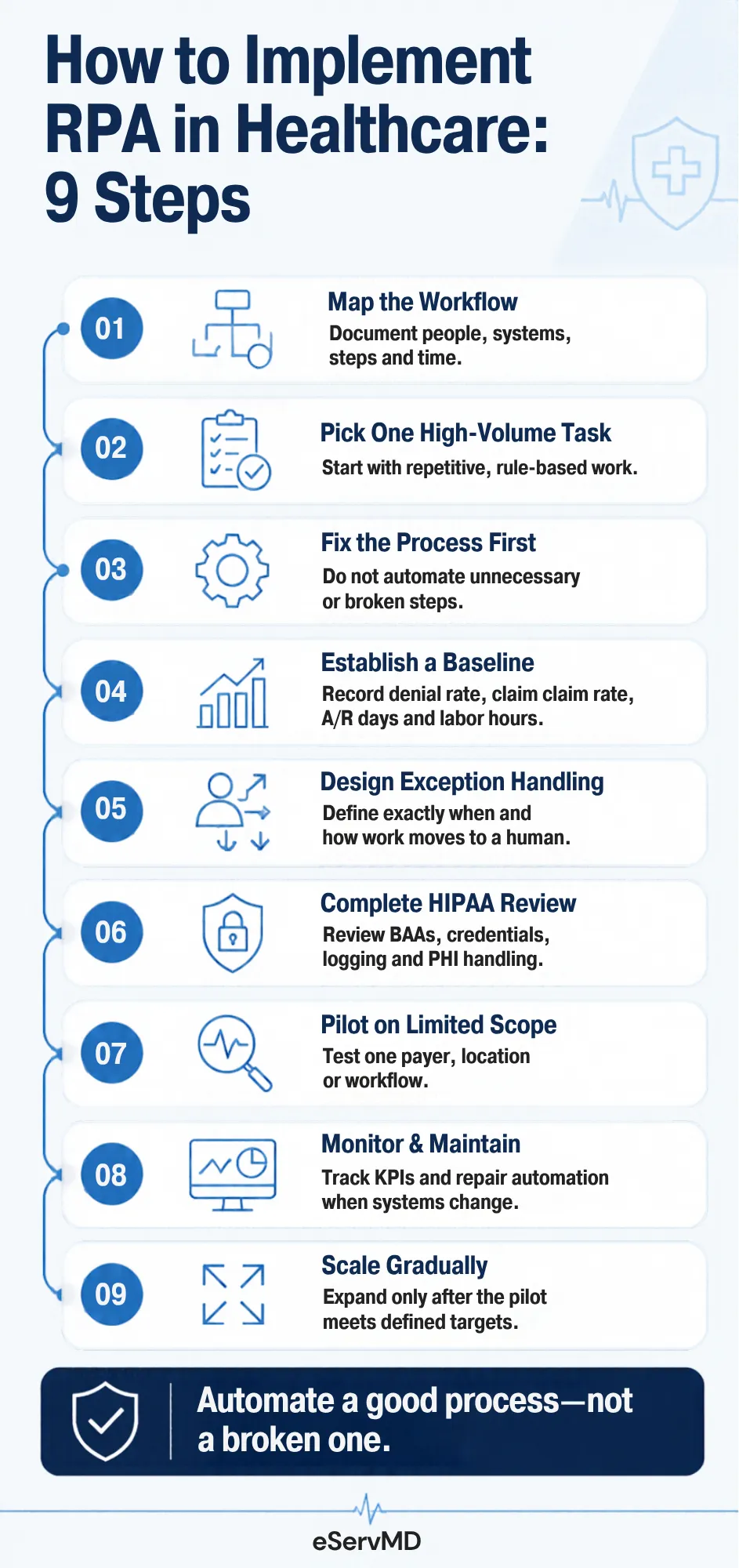
How to Implement RPA: A Step-by-Step Plan
-
Map the current workflow. Document who does what, in which system, and how long it takes.
-
Pick one high-volume, low-judgment task. Eligibility checks and claim status checks are common starting points.
-
Fix the process first. Remove steps that exist only because of old habits. Automating waste creates faster waste.
-
Set a baseline. Record current denial rate, clean claim rate, A/R days and hours spent on the task.
-
Design exception handling. Decide exactly what the bot does when it cannot finish, and who gets the work.
-
Complete the HIPAA review. Confirm BAAs, bot credentials, logging and data-handling rules.
-
Pilot on a limited scope. Run one payer or one location, with human review of outputs.
-
Monitor and maintain. Assign an owner to fix bots when payer sites change.
-
Scale gradually. Add tasks and payers only after the pilot meets its targets.
KPIs to Measure RPA Results
-
Clean claim rate: share of claims accepted on first submission. See our clean claim rate guide.
-
Denial rate and denial reasons: total, plus eligibility- and authorization-related denials separately.
-
Days in A/R: how long claims take to turn into cash.
-
Hours per task: staff time before and after automation.
-
Bot exception rate: how often work falls back to a human; a rising rate signals a broken rule or portal change.
Set your own targets from your baseline rather than copying a benchmark from another organization.
Common Mistakes to Avoid
-
Automating a broken process. Fix registration and coding issues first.
-
No exception path. Work that fails silently is worse than work done by hand.
-
Shared logins. Use unique bot credentials and least-privilege access.
-
No owner. Bots need maintenance whenever a payer site or internal system changes.
-
Skipping the baseline. Without before-and-after numbers, you cannot show return on investment.
-
Treating RPA as a replacement for expertise. Coding accuracy, payer knowledge and appeal skills still decide outcomes.
Expert Considerations Most Guides Miss
-
Fragility is the hidden cost. A script that works today can fail after a portal redesign. Budget for ongoing upkeep, not just launch.
-
Read-only first. Starting with bots that look up information, rather than ones that change records or submit claims, limits the damage from mistakes.
-
Hybrid design wins. Rule-based bots handle the predictable 80 percent of a task, humans handle the rest, and AI is added only where inputs are unstructured. (This is a practical rule of thumb, not a statistic.)
-
Know when not to automate. Low-volume tasks and those requiring judgment rarely justify the maintenance.
Build In-House, Buy a Platform or Outsource?
When comparing RCM automation solutions, the decision usually comes down to volume, technical staff and appetite for ongoing maintenance.
|
Option |
Best for |
Watch out for |
|---|---|---|
|
Build in-house |
Large systems with IT and automation teams |
Maintenance load; key-person risk |
|
Buy an RPA or RCM platform |
Mid-size groups with a defined process owner |
Licensing costs; configuration effort; BAA review |
|
Outsource billing |
Small and mid-size practices, urgent care, labs, new practices |
Choose a partner with transparent reporting and HIPAA safeguards |
If you weigh the outsourcing route, see eServMD's revenue cycle management services.
Conclusion
Robotic process automation in healthcare works best as a disciplined tool for repeatable work: eligibility checks, claim scrubbing, status follow-up and payment posting. It protects revenue by making sure routine steps happen every time, but it does not replace coding skill, payer knowledge or a sound workflow. Start small, measure against a baseline, build in exception handling, and treat HIPAA review as part of the design, not an afterthought.
If you want an experienced billing team to look at where automation would fit in your workflow, you can schedule a demo with eServMD.
Frequently Asked Questions
What is robotic process automation (RPA) in healthcare?
RPA in healthcare is software that mimics human clicks and keystrokes to perform repetitive, rule-based administrative tasks such as eligibility checks, claim submission and payment posting. It follows scripted rules and does not make clinical or coding judgments.
What are the top use cases for RPA in healthcare?
The most common revenue-cycle use cases are eligibility and benefit checks, prior authorization status checks, claim scrubbing, claim submission and status follow-up, payment posting, denial triage and underpayment detection. Outside billing, RPA is also used for scheduling, patient onboarding and reporting.
Is robotic process automation in healthcare HIPAA compliant?
It can be, but it is not automatic. HIPAA compliance depends on how bots access and handle PHI. Use unique bot credentials, limit access, keep audit logs, include bots in your risk analysis and sign a business associate agreement with any vendor that handles ePHI. Confirm details with your compliance officer or counsel.
What is the difference between RPA and AI in healthcare?
RPA follows fixed rules to repeat structured tasks. AI learns from data to interpret unstructured information or make predictions. In billing, RPA might post a payment, while AI might read a clinical note to suggest codes. They are often used together.
What are the benefits and challenges of implementing RPA in hospitals?
Benefits include consistent execution, fewer keying errors, round-the-clock processing and freed-up staff time. Challenges include bots breaking when payer portals change, authentication barriers, the need for governance and security review, integration with older systems, and the risk of automating a flawed process.
Will RPA replace medical billers?
Not in practice. RPA handles repeatable tasks, but denials, appeals, coding questions and payer negotiations still need trained people. The more realistic change is that billers spend less time on data entry and more on exceptions.
Which billing task should we automate first?
Start with a high-volume, rule-based and low-risk task, most often eligibility verification or claim status checks. These are easy to measure and usually have clear rules.
How does the CMS prior authorization rule affect RPA?
CMS-0057-F requires certain payers to offer FHIR-based Prior Authorization APIs, with compliance generally due January 1, 2027. Providers are not required to adopt them, but as payer APIs mature, some portal-based bots may be replaced by direct electronic connections.